Workholding and fixtures
A fixture is steel the machine must not hit. CamCraft keeps it in the collision checks: the post gate reads the fixtures live, so a tool or holder that would strike a vise jaw or a clamp is refused by name before anything posts. Modelling the workholding is how a verify becomes worth trusting. A fixture is never machined; an operation whose source is a fixture is refused.
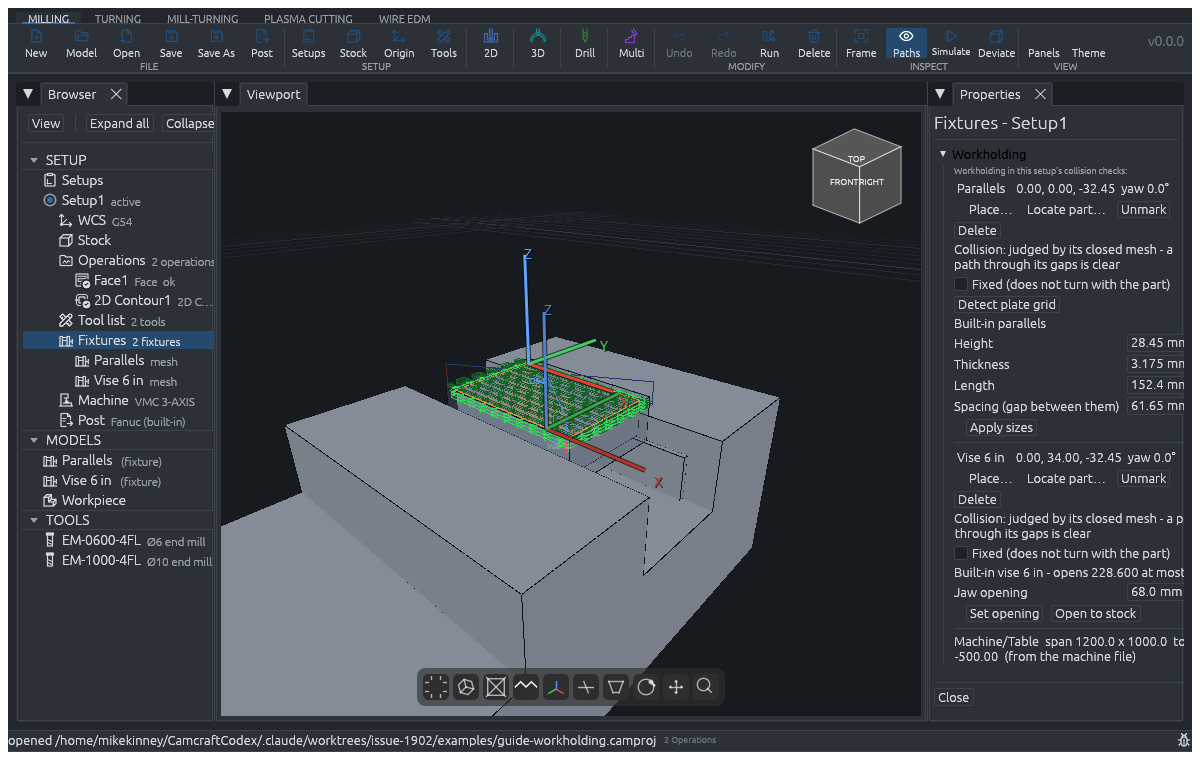
Everything below is added on the setup's Fixtures node in the browser (each setup holds its own), and every placement or edit is one undo step. Each action also has an MCP tool, named under each kind.
 Fixtures node in the browser
(each setup holds its own), and every placement or edit is one undo step.
Each action also has an MCP tool, named under each kind.
Built-in vises
Add built-in vise… opens a dialog with a size (jaw width) list and a 5-axis self-centering list. A standard vise has a fixed jaw and a moving jaw; a self-centering vise closes both jaws on its centre, so the stock sits centred. Place puts it on the machine, fitted to the setup's stock: the dialog shows where the vise lands and how far the jaws open before you place, or says that the setup has no stock yet (it offers Open the Stock page).
On the vise's row, Jaw opening with Set opening edits the opening,
and Open to stock closes the moving jaw against the stock. MCP:
add_builtin_vise, set_vise.
Accessories
Add accessory… adds parallels, a 1-2-3 block, a step block, a strap
clamp or a soft jaw, each generated from a few dimensions you can edit
later. MCP: add_accessory, set_accessory.
The same dialog adds a lathe chuck: a 3-jaw chuck, a 4-jaw chuck or a collet chuck. With Fit to the stock ticked, the chuck closes on the setup's round stock, its face at the stock's underside; the box opens ticked when the stock is round. A jaw chuck has two more choices:
- Grip: Outside (the jaws close on the work) or Inside (in a bore) (the jaws open into the work's bore; the grip diameter is that bore and the jaws run inward from it). An inside grip is placed by position, because the stock does not state its bore.
- Step height and Step depth: stepped jaws. The work sits on the step, so a fitted chuck's face stands the step height under the stock. Leave both at 0 for plain jaws.
Fixture plates and mod vises
Add fixture plate… adds a grid (tooling) plate: size, hole pitch, first
hole offset and thread. Locations on the grid are named like a spreadsheet
cell. A plate row offers Add mod vise pair…: a fixed jaw block and an
adjustable one bolted to chosen grid holes, with Place pair. Edit jaw
block… has Set figures and Re-fit to stock. An imported plate can
have its grid detected. Built-in plates are drawn solid (holes filled),
which is the safe side for the checks. MCP: add_fixture_plate,
set_fixture_plate, add_mod_vise_pair, place_on_plate,
detect_plate_grid, get_plate_grid.
Imported fixtures and the library
Import fixture… reads a mesh or STEP file as a fixture. The steps for a
vendor model (units check, orientation, placement) are in the
vendor fixtures page.
Save fixture to library… keeps a fixture (it asks before it replaces
a same-named entry) and Insert from library… places a saved one in
another setup or document. MCP: add_fixture.
Place a fixture on its row with Place… (X, Y, Z and yaw) or Locate part…, which mates a part face or vertex to a fixture face or vertex (one to three mates, such as a floor, a jaw and a stop). A placement that puts the part, or the stock, inside the fixture gives a warning that names both and a point near the overlap. It is a warning, not a refusal, because a vise is often drawn closed on a nominal part.
Turning workholding
A chuck is a built-in accessory (above) or an imported or library fixture. Leave Fixed (does not turn with the part) off for a chuck, which turns with the part. Tick it for a tailstock or a table, which stands still while a rotary turns the part and is checked in the machine frame.
A lathe or mill-turn setup also has Workholding max rpm on the Setups page (Apply rpm / Clear rpm), the chuck's or collet's rated maximum. It is held to this way:
- Constant surface speed (G96) is clamped to the lowest of the machine's, the tool's and the workholding's maximum.
- A constant-rpm (G97) operation over it is refused at the post, never capped quietly: the cut was planned at that rpm, so the fix is yours.
- Turning the work on the C axis (live tooling) is judged by the machine's C rate against the limit.
MCP: set_workholding_max_rpm. A lathe holder against chuck jaws and
standing steel (#1061) and the index swing against standing steel (#1133)
are in review and not on main yet.
Router and plasma
CamCraft has no vacuum table, spoilboard, slat or tab model. Fixtures are steel to avoid, so a screw or a clamp can be modelled as an imported or accessory fixture, and nothing holds the sheet for you.
Second setups
New setup with Carry stock and WCS over ticked copies the stock and work offset; re-place the copy to describe the re-clamp. A setup whose stock source is what the earlier setup left reads its fixtures against that carried body. A vise jaw or clamp sitting inside material the earlier setup left standing is refused: the setup's fixture "stands inside the stock carried from" the earlier setup, so move the fixture or re-check the hold. Soft jaws for op 2 are an accessory in the second setup. See Setups.
Common refusals
| You did | You see | Fix |
|---|---|---|
| A tool or holder reaches a fixture | the gate's problem line <operation>: <hit> naming the move and the struck steel | move the fixture, or change the toolpath or tool |
| A fixture cannot be judged (an open mesh) | the fixture is judged by its bounding box, which errs toward a hit | repair the mesh, or accept the box |
| Placed a fixture inside the part or stock | warning: the part "would sit inside the fixture", or the stock "would sink into the fixture" | re-place it or re-mate |
| Chuck jaw inside a carried setup's stock | fixture "stands inside the stock carried from" the earlier setup | move the fixture |
| G97 over the chuck's rating | "turns the work at N rpm (G97), over setup's workholding maximum" | lower the tool's rpm, or state the chuck's real rating |
| C-axis turning over the rating, or no C rate stated | "turns the work on the C axis ... over setup's workholding maximum", or "the machine states no C rate" | state the chuck's real rating or the machine's C rate |
| Edited the opening of an imported fixture | "is not a built-in vise (an imported fixture has a fixed shape)" | model the opening you will use, or use a built-in vise |
| A limit under 1 rpm or past the cap | "a workholding maximum must be at least 1 rpm" | type a real rating |
Left out
Soft-jaw cutting, collets and tailstock centres have no model of their own in CamCraft. A stick-out shorter than a vise's depth shows up only as the holder or tool striking the jaw, not as a message of its own.